Write once, native everywhere
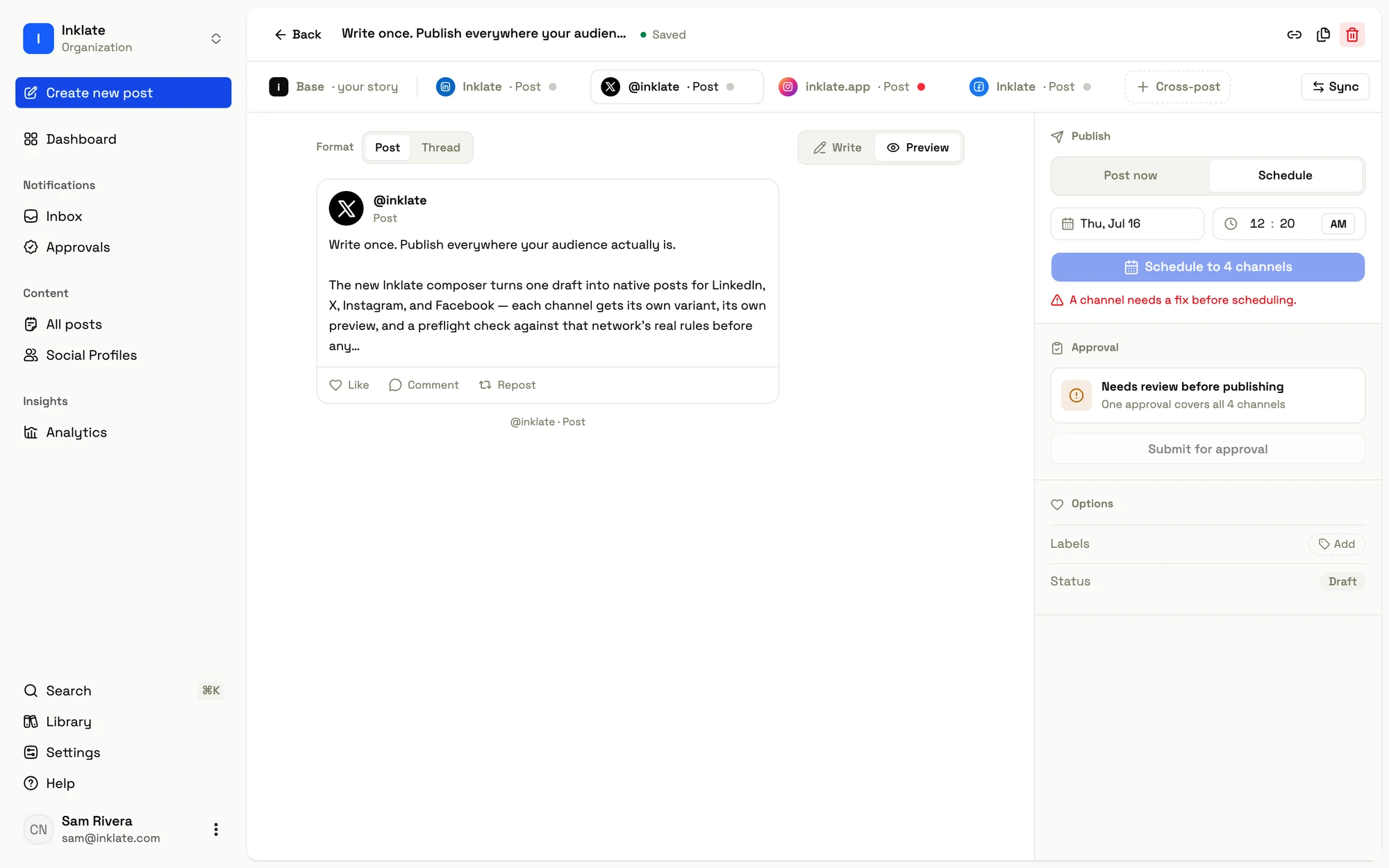
One post adapts into an independent, platform-native copy per channel. Lineage dots track whether each channel copy still follows your story or has been tailored.
Write your post once — the story on the Base tab — and every channel you target gets its own copy of it, adapted to that channel’s provider and format. Each channel copy is independently editable: change a channel’s tab and it detaches from the story, and its tab and sync bar say so. This is how you write LinkedIn long-form while keeping X terse, from the same underlying idea.
How a story becomes a channel copy
Adding a channel materializes its copy once, by adapting the story to the channel’s provider and format: your blocks become the post body, a media group becomes carousel slides, a bullet list becomes plain lines, rich text degrades to what the platform supports. From that moment the channel copy is its own text — nothing propagates automatically. Editing the story afterward doesn’t silently rewrite a channel; it just marks the channel as out of date.
Because content is stored per channel, two channels on the same network start identical and can diverge the instant you edit one of them.
Over the API, the same model rides on per_channel: pass per_channel: { "x": { "content": … } } to author one channel’s copy, format, or provider options without touching the others. per_channel: { "x": null } is the explicit reset — that channel goes back to the adapted story.
The five dots
Each channel tab carries a lineage state, shown as a colored dot and named on its sync bar:
| State | Dot | Meaning |
|---|---|---|
| Synced | Grey | Unchanged since it was last adapted from the story. |
| Edited | Blue | You (or an applied fix) changed it after it was adapted. |
| Stale | Amber | The story changed since this channel synced — re-sync to catch up. |
| Fix | Red | Won’t publish as-is — repair before scheduling. |
| Authored | Violet | Hand-crafted for this channel from the start. |
In prose: a Synced channel matches the story as of its last adaptation (it hasn’t diverged, and the story hasn’t moved since); an Edited or Authored channel has been tailored; a Stale channel is one whose story moved on since it last synced — the story is not auto-pushed, so this is the normal state after you edit your story; and a Fix channel has a validation failure that overrides its lineage, because a channel that can’t publish should be unmistakable even if its copy is technically in sync. An empty story keeps every channel calm rather than flagging failures you haven’t earned yet.
On the wire the public reading is source: adapted (still derived from your story) or authored (you or a fix wrote this channel’s copy).
Your edits are never silently overwritten
The rule that makes tailoring safe: no channel is ever re-adapted implicitly. Editing the story updates only the story — no channel copy is rewritten. A Synced channel simply flips to Stale (its copy is now behind the story), and a channel you tailored — including one an autofix repaired — likewise keeps its copy untouched. A fix is never discarded by a later story edit, and a base edit never quietly fans out across every channel.
The only way a channel picks up the story again is the explicit reset:
- In the composer, the sync bar’s reset action — which confirms first (“Reset to your story? Your edits to this tab will be lost.”).
- Over the API,
per_channel: { "<channel>": null }— orper_channel: { "<channel>": { "copy_from": { "channel": "shared" } } }to push only the text or only the media (below).
The Sync Copy & Assets dialog
The channel bar’s Sync button opens a dialog for copying across channels at once:
- Source — the Base story (default) or any other channel’s copy.
- Targets — for each channel, choose to copy its copy (text), its assets (media), or both.
Copying from one channel to another goes through a single normalization — the source is lifted back to a story-shaped document and then adapted to the target — so there’s one transform, not a converter per platform pair. The dialog overwrites each target you tick (ticking a target is the confirmation), and leaves untouched any channel you didn’t pick.
It rides the same post write as everything else, on every door — dashboard, API, CLI, and MCP alike. Each ticked target carries a per_channel copy-from directive:
{ "per_channel": { "x": { "copy_from": { "channel": "shared", "text": true, "media": true } } } }channel names the source: "shared" for the content every channel adapts from, or another channel this post already targets (a channel id or a provider name like "linkedin"). text and media choose which halves to overwrite — both default to true, and the half you leave out keeps the target’s current content. Text-only keeps the target’s images; media-only keeps its wording.
This is the granular sibling of the whole-channel reset per_channel: { "<channel>": null }, and it is the one write that overwrites a channel you may have tailored — so it always names its targets.
Writing posts
Write in a rich-text editor that supports bold, italic, links, headings, and lists, plus markdown shortcuts — and see each render natively per platform.
Images and video
Attach images and video that upload directly over a presigned PUT and are validated against each channel's limits, moving through processing to ready or failed.